
Website in Hindi: वेबसाइट internet पर मौजूद web pages का एक collection होती है जिसे एक unique domain name के माध्यम से web browser जैसे Chrome, Edge या Firefox में access किया जाता है। आसान शब्दों में, website कई web pages का एक समूह होता है जिसमें text, images, videos और information stored रहती है।
अगर आप Website क्या है, Website meaning in Hindi, Website के types, examples और uses के बारे में जानना चाहते हैं तो इस article में आपको पूरी जानकारी सरल भाषा में मिलेगी।
आज के digital world में हर business, company और individual की अपनी website होती है जिससे information share करना, services देना और online presence बनाना आसान हो जाता है।
Table of Contents
वेबसाइट क्या है (What is Website in Hindi)?

Website internet पर मौजूद web pages का एक collection होता है जिसमें information, images, videos और different types का digital content stored होता है। इन web pages को एक domain name के माध्यम से access किया जाता है और यह web server पर host होते हैं।
सरल शब्दों में: Website कई web pages का एक समूह होता है जो एक ही domain name के अंतर्गत जुड़े होते हैं और जिन्हें internet के माध्यम से access किया जा सकता है।
जब कोई user browser जैसे Google Chrome, Microsoft Edge या Firefox में किसी website का address (URL) डालता है, तो browser उस website के server से data लाकर user को दिखाता है।
Website को आसान उदाहरण से समझें
उदाहरण के लिए:
- Google.com: Search engine website
- Facebook.com: Social media website
- Amazon.in: E-commerce website
- Wikipedia.org: Information website
इन सभी websites में कई web pages होते हैं जो अलग-अलग information provide करते हैं।
Website की मुख्य विशेषताएं
एक website की कुछ basic characteristics होती हैं:
- Website कई web pages से मिलकर बनती है
- Website का एक unique domain name होता है
- Website internet पर host होती है
- Website को browser की मदद से access किया जाता है
- Website information share करने का platform होती है
Website क्यों जरूरी है?
आज के digital world में website बहुत important हो गई है क्योंकि:
- Businesses online presence बनाने के लिए website बनाते हैं
- Students learning resources के लिए websites use करते हैं
- Companies services promote करने के लिए website use करती हैं
- Individuals blogging और portfolio के लिए website बनाते हैं
Website की Definition (Website Meaning in Hindi)
Website की definition: Website internet पर उपलब्ध web pages का एक structured collection होता है जिसे एक unique domain name के द्वारा access किया जाता है और जो web server पर store रहता है।
Technical Definition: A website is a collection of interconnected web pages stored on a web server and accessible through the internet using a domain name.
Simple Definition: Website कई web pages का समूह होती है जिसमें information होती है और जिसे internet के माध्यम से देखा जा सकता है।
Website Meaning in Hindi
Website का Hindi meaning होता है: इंटरनेट पर मौजूद जानकारी का एक स्थान (collection of web pages) जहां text, images, videos और services उपलब्ध होती हैं।
उदाहरण के लिए: अगर आप www.google.com open करते हैं तो यह एक website है जिसमें कई web pages होते हैं जैसे search page, images page, maps page आदि।
Website Definition को आसान शब्दों में समझें
Website को आप एक digital book की तरह समझ सकते हैं:
- Book = Website
- Pages = Web pages
- Book Name = Domain Name
- Library = Internet
इस example से समझ सकते हैं कि जैसे एक book में कई pages होते हैं वैसे ही एक website में कई web pages होते हैं।
Website कैसे काम करती है (How Website Works)
Website की working एक simple process पर आधारित होती है जिसमें User, Web Browser, Web Server और Internet मिलकर काम करते हैं। जब भी कोई user किसी website को open करता है तो background में कई technical steps होते हैं।
नीचे Website की working process को आसान steps में समझाया गया है:
Step 1: User URL Enter करता है
सबसे पहले user browser जैसे Google Chrome, Edge या Firefox में website का address (URL) डालता है जैसे: www.example.com
इस URL को डालते ही request internet के माध्यम से server तक भेजी जाती है।
Step 2: DNS Domain Name को IP Address में Convert करता है
Computer domain name नहीं बल्कि IP Address समझता है। इसलिए DNS (Domain Name System) domain name को IP address में convert करता है।
Example: example.com – 192.168.1.1 (example IP)
Step 3: Request Web Server तक जाती है
Browser द्वारा भेजी गई request web server तक पहुंचती है जहां website की files stored होती हैं।
इन files में शामिल होते हैं:
Step 4: Server Response भेजता है
Web server request को process करता है और website का data browser को भेज देता है। इस process को Server Response कहते हैं।
Step 5: Browser Website Display करता है
Browser received data को process करके user की screen पर website display कर देता है।
Example:
- Text दिखाई देता है
- Images load होती हैं
- Buttons काम करते हैं
Website के मुख्य Components (Main Components of a Website)
किसी भी website को properly काम करने के लिए कुछ important components की जरूरत होती है। इन components के बिना website internet पर exist नहीं कर सकती।
Website के मुख्य components नीचे दिए गए हैं:
1. Domain Name
Domain Name website का address होता है जिसकी मदद से users website को internet पर access करते हैं।
Example:
• google.com
• amazon.in
• facebook.com
Domain name website की identity होती है और यह unique होता है।
2. Web Hosting
Web Hosting वह service होती है जहां website की सभी files और data store होते हैं। Website को internet पर live रखने के लिए hosting जरूरी होती है।
Example hosting providers:
- Hostinger
- GoDaddy
- Bluehost
Hosting को आप website का storage भी कह सकते हैं।
3. Web Pages
Website कई web pages से मिलकर बनती है। हर page का अलग purpose होता है।
Example:
- Home Page
- About Page
- Contact Page
- Services Page
ये सभी मिलकर एक complete website बनाते हैं।
4. Content
Content website का सबसे important part होता है क्योंकि users information देखने के लिए website visit करते हैं।
Content में शामिल हो सकते हैं:
- Text
- Images
- Videos
- Infographics
- Blog articles
Good content website की quality improve करता है।
5. Web Browser
Web Browser वह software होता है जिसकी मदद से users website open करते हैं।
Examples:
- Google Chrome
- Microsoft Edge
- Mozilla Firefox
- Safari
Browser website को properly display करता है।
6. Website Design
Website का design उसकी appearance और user experience को define करता है। Good design website को attractive और easy to use बनाता है।
Website design में शामिल होते हैं:
• Layout
• Colors
• Navigation
• Fonts
Website बनाने के लिए domain, hosting और content सबसे important components माने जाते हैं।
वेबसाइट के प्रकार (Types of Website in Hindi)
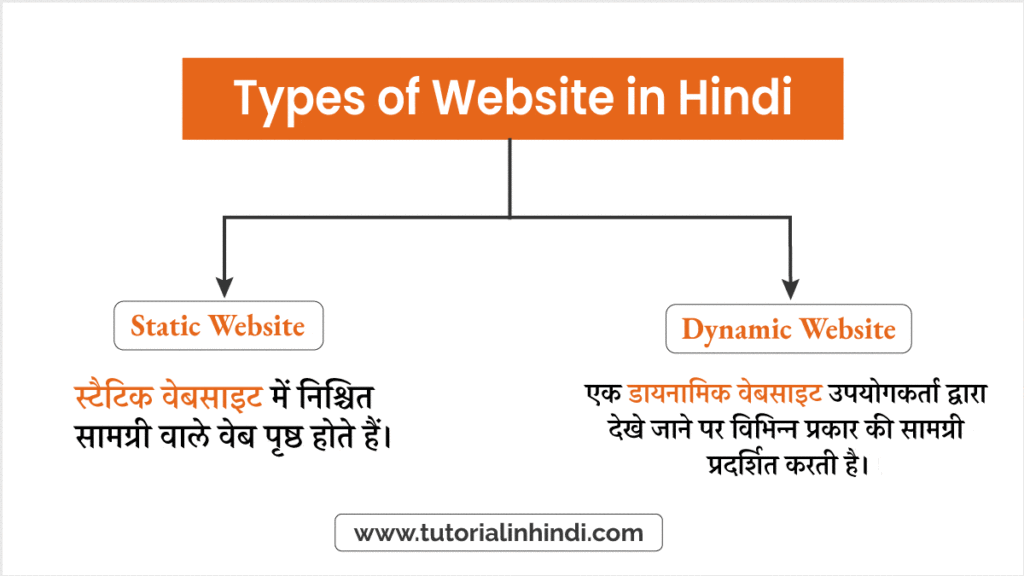
मुख्य रूप से वेबसाइट दो (2) प्रकार की होती है:
- स्टैटिक वेबसाइट (Static website)।
- डायनामिक वेबसाइट (Dynamic website)।
आइए इन दोनो प्रकार के वेबसाइट को समझते है –
Static Website क्या है
एक स्टैटिक वेबसाइट (कभी-कभी एक फ्लैट या stationary page कहा जाता है) एक वेब ब्राउज़र में ठीक उसी तरह प्रदर्शित होती है जैसे इसे संग्रहीत किया जाता है। Static वेबसाइट में निश्चित सामग्री वाले वेब पृष्ठ होते हैं। प्रत्येक पृष्ठ को एचटीएमएल में कोड किया जाता है और प्रत्येक visitor को समान जानकारी प्रदर्शित करता है।
मूल रूप से, स्टेटिक वेबसाइटें होस्ट करने के लिए सस्ती, त्वरित और बनाने में आसान हैं। Static वेबसाइट बनाने के लिए आपको वेब प्रोग्रामिंग और डेटाबेस डिज़ाइन के ज्ञान की आवश्यकता नहीं है। आमतौर पर, इस प्रकार की वेबसाइटों को HTML, CSS और JavaScript में कोडिंग किया जाता है।
Dynamic Website क्या है
एक गतिशील (dynamic) वेबसाइट में ऐसी सामग्री और जानकारी होती है जो वेबसाइट के दर्शक, दिन के समय, समय क्षेत्र या दर्शक देश की मूल भाषा जैसे कारकों के आधार पर बदलती है।
सरल शब्दों में, एक डायनामिक वेबसाइट एक ऐसी वेबसाइट है जो हर बार उपयोगकर्ता द्वारा देखे जाने पर विभिन्न प्रकार की सामग्री प्रदर्शित करती है। आपकी साइट की सामग्री (टेक्स्ट/इमेज) एक डेटाबेस या सामग्री प्रबंधन प्रणाली (CMS) पर संग्रहीत होता है।
Most Common Types of Websites in Hindi
अपनी खुद की वेबसाइट बनाने से पहले, आपको यह तय करना होगा कि किस प्रकार की वेबसाइट बनानी है।
यहां 2023 में कुछ सबसे लोकप्रिय वेबसाइट के प्रकार की सूची दी गई है:
| # | लोकप्रिय वेबसाइट के प्रकार | विवरण |
|---|---|---|
| 1. | eCommerce वेबसाइट | एक ईकामर्स वेबसाइट आपको अपने ऑनलाइन स्टोर से उत्पाद बेचने की अनुमति देती है। |
| 2. | Blog वेबसाइट | ब्लॉग वेबसाइटें लोगों के लिए अपनी इच्छा के बारे में लिखित और दृश्य सामग्री साझा करने का स्थान हैं। |
| 3. | Informational वेबसाइट | सूचनात्मक वेबसाइटें सूचना convey करने के लिए एक संसाधन के रूप में कार्य करती हैं। |
| 4. | Business वेबसाइट | एक व्यावसायिक वेबसाइट एक उच्च सड़क की दुकान या प्रमुख कार्यालय के मालिक होने के लिए एक ऑनलाइन समकक्ष है। |
| 5. | Portfolio वेबसाइट | रचनात्मक पेशेवर, जैसे ग्राफिक डिजाइनर, वेब डिजाइनर, कलाकार और लेखक, अपने काम के उदाहरणों को समेकित और प्रदर्शित करने के लिए पोर्टफोलियो वेबसाइटों का उपयोग करते हैं। |
| 6. | Membership वेबसाइट | एक सदस्यता वेबसाइट अपने संसाधनों, उपकरणों, या सेवाओं तक पूर्ण पहुंच प्राप्त करने के लिए आगंतुकों को साइन अप करने या शुल्क का भुगतान करने की आवश्यकता के द्वारा विशिष्टता सुनिश्चित करती है। |
| 7. | Event वेबसाइट | एक इवेंट वेबसाइट सुव्यवस्थित इवेंट मैनेजमेंट, आमंत्रण से लेकर मार्केटिंग तक और यहां तक कि फॉलो-अप के माध्यम से भी अनुमति देती है। |
| 8. | Online forum वेबसाइट | एक ऑनलाइन फ़ोरम आपको एक साझा हित के आसपास एक समुदाय बनाने की अनुमति देता है। यह केवल सदस्यों तक पहुंच को प्रतिबंधित करके लाभ कमाने की अनुमति भी देता है। |
| 9. | Personal वेबसाइट | एक निजी वेबसाइट आपकी ऑनलाइन उपस्थिति को बढ़ावा देने का एक शानदार तरीका है। |
| 10. | Nonprofit वेबसाइट | एक गैर-लाभकारी वेबसाइट आपके ऑनलाइन मिशन का केंद्र है। इस प्रकार की वेबसाइटें उपयोग करने, दान प्रपत्र आदि के लिए स्वतंत्र हैं। |
Website के उदाहरण (Examples of Website in Hindi)
Website को बेहतर तरीके से समझने के लिए examples देखना बहुत helpful होता है। Internet पर अलग-अलग purpose के लिए अलग-अलग प्रकार की websites मौजूद हैं जैसे search engines, e-commerce websites, educational websites और social media platforms।
नीचे कुछ popular Website examples दिए गए हैं:
1. Search Engine Website
Search engine websites का उपयोग internet पर information खोजने के लिए किया जाता है।
Examples:
• Google
• Bing
• Yahoo
इन websites की मदद से users किसी भी topic पर information ढूंढ सकते हैं।
2. E-commerce Website Example
E-commerce websites products को online buy और sell करने के लिए बनाई जाती हैं।
Examples:
• Amazon
• Flipkart
• Meesho
इन websites में product listing, cart system और online payment features होते हैं।
3. Educational Website Example
Educational websites learning resources और tutorials provide करती हैं।
Examples:
• TutorialInHindi.com
• Wikipedia
• W3Schools
इन websites का purpose knowledge sharing और education होता है।
4. Social Media Website Example
Social media websites communication और networking के लिए बनाई जाती हैं।
Examples:
• Facebook
• Instagram
• Twitter (X)
इन websites की मदद से users connect और content share करते हैं।
5. Business Website Example
Business websites company information और services show करने के लिए बनाई जाती हैं।
Examples:
• Company official websites
• Service provider websites
इनका main purpose brand promotion होता है।
Website का उपयोग (Uses of Website)
आज के digital युग में website का उपयोग कई different purposes के लिए किया जाता है। Information sharing से लेकर online business और communication तक, website का role बहुत important हो गया है।
नीचे Website के कुछ मुख्य उपयोग (Uses of Website) दिए गए हैं:
1. Information Share करने के लिए
Websites का सबसे common use information provide करना होता है। Educational websites, news websites और tutorial websites knowledge share करने के लिए बनाई जाती हैं।
Example:
• Educational blogs
• News portals
• Tutorial websites
2. Online Business के लिए
Businesses अपने products और services को promote करने के लिए website का उपयोग करते हैं। Website की मदद से companies online customers तक पहुंचती हैं।
Example:
• Company websites
• Service websites
• E-commerce platforms
3. Online Shopping के लिए
Website का उपयोग online shopping के लिए भी किया जाता है जहां users products browse और purchase कर सकते हैं।
Example:
• Amazon
• Flipkart
इन websites में product listing और payment system होता है।
4. Communication के लिए
कुछ websites communication और networking के लिए बनाई जाती हैं।
Example:
• Social media websites
• Email services
इनकी मदद से users message भेज सकते हैं और connect रह सकते हैं।
5. Online Learning के लिए
Educational websites students को online learning resources provide करती हैं।
Example:
• Tutorial websites
• Course platforms
• Documentation websites
आज students learning के लिए websites पर depend करते हैं।
6. Online Services के लिए
Website का उपयोग services provide करने के लिए भी किया जाता है।
Example:
• Online banking
• Ticket booking
• Government services
इन websites की मदद से users घर बैठे services ले सकते हैं।
वेबसाइट के फायदे (Advantages of Website in Hindi)
Website के फायदे: Website businesses, students और individuals को online presence बनाने, information share करने और services provide करने में मदद करती है।
यहां Website के कुछ मुख्य advantages दिए गए हैं:
- 24/7 Online Presence – Website आपकी online presence पूरे समय active रखती है।
- Easy Accessibility – Website को कहीं से भी और कभी भी access किया जा सकता है।
- Business Credibility Increase – Website company की trust और credibility बढ़ाती है।
- Business Growth Opportunity – Website नए customers तक पहुंचने का अवसर देती है।
- Digital Marketing Support – Website online marketing और promotion आसान बनाती है।
- Fast Communication – Website customers से communication आसान बनाती है।
- Customer Trust Build करती है – Professional website customer confidence बढ़ाती है।
- Online Selling Possible बनाती है – Website के माध्यम से products और services online sell किए जा सकते हैं।
वेबसाइट के नुकसान (Disadvantages of Website in Hindi)
यहां वेबसाइट के कुछ महत्वपूर्ण नुकसान दिए गए हैं:
- वेबसाइट बनाने और maintain करने में cost लगती है।
- वेबसाइट को secure रखने के लिए regular updates की जरूरत होती है।
- Internet connection के बिना website access नहीं की जा सकती।
- Website hacking और cyber attacks का खतरा रहता है।
- Website management के लिए technical knowledge की जरूरत पड़ सकती है।
- Server issues होने पर website temporarily बंद हो सकती है।
- Regular content update न करने पर website की ranking गिर सकती है।
Website vs Webpage Difference (Website और Webpage में अंतर)
बहुत लोग Website और Webpage को same समझते हैं, लेकिन दोनों अलग concepts हैं। Website कई webpages का collection होती है जबकि webpage website का एक single page होता है।
नीचे Website और Webpage का difference table में दिया गया है:
| Basis | Website | Webpage |
|---|---|---|
| Definition | Website कई webpages का collection होती है | Webpage website का एक single page होता है |
| Structure | Multiple pages से मिलकर बनती है | Website का एक part होता है |
| Example | amazon.in, google.com | Home page, Contact page |
| Purpose | Complete information platform | Specific information provide करता है |
| URL | Main domain name होता है | Domain के साथ specific page link होता है |
| Complexity | Complex structure | Simple structure |
वेबसाइट डिजाइनिंग सीखें हिंदी में
यदि आप वेब डिजाइनिंग या वेबसाइट डिजाइनिंग सीखना चाहते हैं तो यहां वेबसाइट डिजाइनिंग के बारे में हमारा विस्तृत ट्यूटोरियल है:
Website in Hindi FAQs:
यहां Website in Hindi के बारे में उनके उत्तरों के साथ अक्सर पूछे जाने वाले कुछ प्रश्न दिए गए हैं:
Website web pages का collection होती है जिसे internet के माध्यम से domain name की मदद से access किया जाता है।
Website मुख्य रूप से दो प्रकार की होती है:
• Static Website
• Dynamic Website
इसके अलावा purpose के आधार पर कई types भी होते हैं।
पहली website 1990 में Tim Berners-Lee द्वारा CERN में बनाई गई थी।
Website का main purpose information provide करना, services देना और online presence बनाना होता है।
Website कई webpages का collection होती है जबकि webpage website का एक single page होता है।
Website बनाने के लिए domain name, web hosting और website content की जरूरत होती है।
क्या आप वेब डेवलपर बनने में रुचि रखते हैं?
वेब डेवलपर कैसे बनें, इस बारे में हमारी गाइड देखें। यह उन कौशलों, उपकरणों और संसाधनों पर बहुमूल्य जानकारी से भरा हुआ है, जिनकी आपको शुरुआत करने के लिए आवश्यकता है। हमारे गाइड को पढ़ने और वेब डेवलपमेंट में करियर की दिशा में अपनी यात्रा शुरू करने के लिए यहां क्लिक करें:
निष्कर्ष
वेबसाइट एक ही डोमेन के अंतर्गत स्थित वेबपृष्ठों का एक संग्रह है। मूल रूप से, एक वेबसाइट HTML दस्तावेज़ों का एक संग्रह है जो कुछ जानकारी या सामग्री को ऑनलाइन प्रस्तुत, साझा या प्रदर्शित करते हैं।
वेबसाइट कई प्रकार की हो सकती है, जैसे ई-कॉमर्स वेबसाइट, सोशल मीडिया वेबसाइट, या ब्लॉग वेबसाइट, और हर वेबसाइट की एक अलग भूमिका होती है, लेकिन एक बात कॉमन है कि हर वेबसाइट में कई लिंक्ड वेब पेज होते हैं।
मुझे उम्मीद है कि यह लेख “Website in Hindi” आपको यह समझने में मदद करेगा कि वेबसाइट क्या है और इसके विभिन्न प्रकार और फायदे आदि क्या हैं।